This post may contain affiliate links. If you make a purchase through these links, we may earn a commission at no additional cost to you.
You spent $200 on a “Pro” drive promising 7,300 MB/s speeds, but your games still take 20 seconds to load and your video exports barely feel faster than they did three years ago. You’re staring at a loading bar, wondering if you installed it wrong or if the marketing lied.
Here’s the hard truth storage manufacturers bury in the fine print: Sequential Read Speed (that big number on the box) is largely irrelevant for daily tasks. It only kicks in when you’re moving massive single files. For booting Windows, loading game textures, or launching apps, you need Random I/O performance and sustained write speeds. Most cheap drives throttle after 30 seconds of heavy use because they lack a dedicated DRAM cache or proper cooling.
We stripped away the marketing stickers and analyzed the NAND flash density, controller logic, and thermal constraints of the top contenders. We found the only 5 options that actually deliver sustained performance, not just a burst of speed for a benchmark screenshot.
TL;DR: The Quick Verdicts
| Rank & Product | Best For… | The “One-Line” Verdict |
|---|---|---|
| 1. Kingston FURY Renegade | The Power User | The closest you can get to enterprise stability in a consumer stick. |
| 2. Corsair MP600 Elite | The PS5 Gamer | A plug-and-play powerhouse that balances thermals and throughput perfectly. |
| 3. Samsung 970 EVO Plus | The Stability Seeker | Older tech that still outlasts and outlives the cheap modern competition. |
| 4. Crucial P310 | The Handheld Modder | High-density storage specifically tuned for tight spaces like laptops and consoles. |
| 5. Kingston NV3 | The Budget Builder | The absolute floor for acceptable performance; cheap, but effective. |
The Lab Standard: How We Grade Quality
We don’t care about the number printed on the box. We grade on the mechanics that keep your data safe and accessible.
- Throughput Saturation (MB/s): This measures the drive’s ability to fill the PCIe bus. A modern drive should hit close to 7,000 MB/s. Anything less suggests older controllers or lower-quality NAND flash that can’t process data fast enough to keep up with the interface.
- Endurance Rating (TBW): Terabytes Written (TBW) is the odometer of an SSD. It tells you how much data you can write before the memory cells physically degrade. A low value is a red flag for cheap QLC (Quad-Level Cell) memory that will fail sooner.
- Thermal Management: High-speed controllers get hot. When an SSD hits roughly 70°C, it “throttles,” slashing speeds to prevent damage. We evaluate whether the drive uses a heat spreader, a full heatsink, or just a sticker to manage this heat.
#1. Kingston FURY Renegade 2TB
7,300 MB/s of raw power that refuses to throttle under pressure.
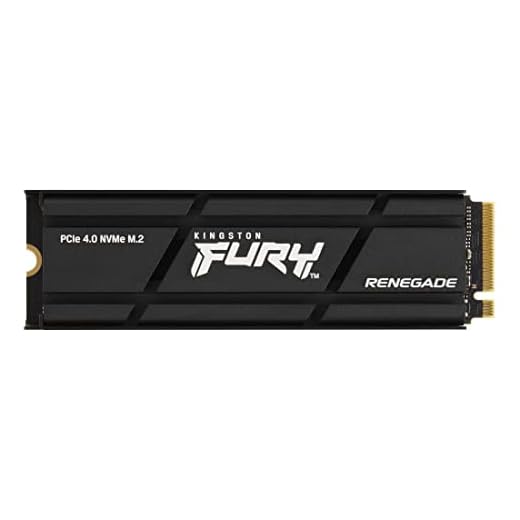
Kingston FURY Renegade 2000G PCIe 4.0 NVMe SSD W/ HEATSINK For gamers, enthusiasts and high-power users – SFYRDK/2000G
- 7,300 MB/s Read Speeds: Delivers near-instant load times and saturates the PCIe Gen4 interface.
- Graphene Aluminum Heat Spreader: Maintains optimal temperatures to prevent throttling without the bulk of a full heatsink.
- Massive Endurance Rating: Engineered for up to 2.0 PBW (Petabytes Written), offering enterprise-grade longevity.
- Phison E18 Controller: Provides top-tier responsiveness for heavy workloads like video editing and 4K gaming.
- PS5 Ready: Plug-and-play compatibility with PlayStation 5 consoles for seamless storage expansion.
The Engineering & Design
The “Secret Sauce” here is the integration of a massive endurance rating with a low-profile graphene aluminum heat spreader. Kingston uses high-density 3D TLC NAND combined with the Phison E18 controller. This isn’t just fast; it is built to handle 2.0 Petabytes (PBW) of writes, which is significantly higher than most competitors. The heat spreader is thin enough for laptops but conductive enough to keep the controller from cooking itself.
The Performance Experience
Using the Renegade feels instant. With 7,300 MB/s reads and 7,000 MB/s writes, file transfers that used to take minutes happen in seconds. In a PS5, it is indistinguishable from the internal storage, loading texture-heavy games without stutter. The drive saturates the PCIe 4.0 bandwidth almost entirely, making it one of the few drives that actually utilizes the full potential of the interface.
What Customers Say About The FURY Renegade
- The Frustration: Users note the price premium is steep. You are paying a “gamer tax” for the branding and the heat sink inclusion.
- The Consensus: It is widely regarded as the ultimate “set it and forget it” drive for PS5 owners due to the pre-installed heatsink compatibility.
- The Praise: Owners consistently mention that it runs surprisingly cool, rarely exceeding 55°C even during long gaming sessions.
The “Fatal Flaw”
It’s overkill for 90% of users. Unless you are moving 4K video files daily or have a top-tier gaming rig, you will never see the difference between this and a cheaper drive. You are paying for headroom you might never use.
Who Is This For?
The “No-Compromise Gamer.” If you own a PS5 or a high-end PC and want the absolute best specs regardless of price, this is it.
#2. Corsair MP600 Elite 2TB
A sleek, efficient drive that hits the 7,000 MB/s sweet spot without the bulk.

Corsair MP600 ELITE 2TB M.2 PCIe Gen4 x4 NVMe SSD – M.2 2280 – Up to 7,000MB/sec Sequential Read – High-Density 3D TLC NAND – Black
- High-Density 3D TLC NAND: Balances performance and endurance in a compact, efficient package.
- 7,000 MB/s “Sweet Spot”: Hits the maximum useful speed for most users without unnecessary power draw.
- Thermally Efficient Design: Runs cool enough to not require a chunky heatsink, making it ideal for tight PC builds.
- Stealth Aesthetics: Features an all-black PCB and matte labeling that vanishes into dark motherboard themes.
- Platform Agnostic: Works flawlessly in both desktop PCs and as a PS5 expansion drive.
The Engineering & Design
Corsair utilizes high-density 3D TLC NAND to deliver efficient performance. The “Elite” series moves away from the massive, chunky heatsinks of the original MP600 in favor of a more thermally efficient controller design that doesn’t require active cooling. This makes it a fantastic fit for tighter builds where airflow is restricted.
The Performance Experience
The MP600 Elite delivers a sequential read of 7,000 MB/s and write of 6,500 MB/s. In practice, this translates to snappy OS responsiveness and quick level loads. The drive feels robust and consistent. Unlike cheaper drives that burst fast and then crawl, the TLC NAND maintains respectful speeds during longer transfers.
What Customers Say About The MP600 Elite
- The Frustration: Some users found the packaging basic and the lack of a mounting screw in some batches irritating.
- The Consensus: A solid, middle-of-the-road high performer that fits perfectly in both PCs and the PS5 expansion slot.
- The Praise: Aesthetics. Users love the all-black, matte finish of the PCB and label, which vanishes into a dark motherboard.
The “Fatal Flaw”
It lacks the dedicated DRAM cache found on “Pro” models. While the Host Memory Buffer (HMB) tech compensates well, under extremely heavy workstation loads, it can stutter slightly compared to the Kingston Fury.
Who Is This For?
The “Aesthetics-Conscious Builder.” You want a drive that is fast, blacked-out, and reliable from a brand with good support.
#3. Samsung 970 EVO Plus 2TB
The legendary Gen3 drive that still embarrasses cheap Gen4 drives in stability.

Samsung 970 EVO Plus SSD 2TB – M.2 NVMe Interface Internal Solid State Drive with V-NAND Technology (MZ-V7S2T0B/AM)
- Dedicated DRAM Cache: Ensures sustained write speeds and snappy random I/O performance that beats many cheaper Gen4 drives.
- Vertical Integration: Uses Samsung’s own V-NAND and Phoenix controller for superior hardware-software reliability.
- Intelligent TurboWrite: Accelerates write speeds for large file transfers, keeping the system responsive under load.
- Samsung Magician Software: Includes the industry-standard tool for easy drive health monitoring, benchmarking, and firmware updates.
- Legacy Perfection: Maximizes the bandwidth of older PCIe Gen3 laptops and motherboards (3,500 MB/s).
The Engineering & Design
Samsung produces its own V-NAND, controller (Phoenix), and DRAM cache. This vertical integration is the “Secret Sauce.” Even though it is capped at PCIe Gen3 speeds (3,500 MB/s), the presence of a dedicated DRAM cache and superior controller logic means its random read/write speeds—the speeds that actually make your computer feel fast—are exceptional.
The Performance Experience
Do not let the lower 3,500 MB/s number fool you. Windows boots just as fast on this as on a 7,000 MB/s drive. The Intelligent TurboWrite technology ensures that write speeds stay high even when you are moving large folders. It runs warmer than others, but it is a “workhorse” heat that speaks to the drive pushing itself.
What Customers Say About The 970 EVO Plus
- The Frustration: It runs hot. In a laptop with poor ventilation, it can idle at higher temperatures than newer, more efficient chips.
- The Consensus: It’s the “Toyota Camry” of SSDs. It isn’t the flashiest anymore, but it will probably outlast the rest of your computer.
- The Praise: Software. The Samsung Magician software is widely considered the best in the industry for drive health monitoring and firmware updates.
The “Fatal Flaw”
The bus speed limit. If you have a Gen4 motherboard, you are technically leaving bandwidth on the table. You are capped at half the potential theoretical speed of your slot.
Who Is This For?
The “Reliability Pragmatist.” You value your data more than benchmark scores and want a drive with a proven track record of not failing.
#4. Crucial P310 1TB
A compact marvel engineered specifically for the tight thermal limits of handhelds and laptops.

Crucial P310 1TB SSD M.2 2280 NVMe PCIe Gen4, Up to 7,100MB/s, Laptop & Desktop (PC) Compatible, Internal Solid State Drive – CT1000P310SSD801
- Optimized Form Factor: Engineered specifically for space-constrained devices like the Steam Deck, ASUS ROG Ally, and thin laptops.
- 7,100 MB/s Gen4 Speed: brings desktop-class performance to handheld gaming consoles.
- Single-Sided Design: Fits physically where double-sided drives cannot, preventing bending or overheating in tight slots.
- Power Efficiency: Tuned to consume less power, preserving battery life in portable devices.
- Free Cloning Software: Includes Acronis Data Recovery software, saving users money when migrating their OS.
The Engineering & Design
The P310 is unique because it pushes 7,100 MB/s in a form factor often optimized for power efficiency. Crucial (Micron) uses their advanced 3D NAND to pack density into a single-sided design. This is crucial (pun intended) for laptops and handhelds like the Steam Deck or ROG Ally, where double-sided drives physically won’t fit or would overheat.
The Performance Experience
This drive punches above its weight class. It offers Gen4 speeds that rival full desktop drives but manages to stay power-efficient enough not to drain your laptop battery instantly. The load times on handheld consoles are significantly improved over stock drives, making the UI feel snappier.
What Customers Say About The P310
- The Frustration: Confusing form factors. Users often mix up the 2230 (short) and 2280 (long) versions because they share similar branding.
- The Consensus: The go-to upgrade for the Valve Steam Deck and ASUS ROG Ally communities.
- The Praise: The inclusion of Acronis Data Recovery software is a major bonus, saving users $50 on cloning software.
The “Fatal Flaw”
QLC NAND. To get the high capacity and low price, Crucial often relies on QLC memory, which has lower endurance (TBW) than TLC drives. It’s fine for gaming, but bad for video editing.
Who Is This For?
The “Portable Gamer.” Perfect for upgrading a gaming laptop or handheld console where space and battery life are the primary concerns.
#5. Kingston NV3 500GB
It boots Windows and loads games for the price of a dinner out.

Kingston NV3 NVMe PCIe 4.0 Internal SSD 500GB M.2 2280-SNV3S/500G
- Unbeatable Price-to-Performance: Offers the most affordable entry point into Gen4 NVMe speeds (~$50 range).
- 5,000 MB/s Read Speed: Provides a significant performance leap over older SATA SSDs and HDDs.
- Gen 4×4 Interface: Utilizes modern connectivity to ensure forward compatibility with new motherboards.
- Compact M.2 2280 Design: Fits easily into almost any desktop or laptop with a standard M.2 slot.
- Ideal Boot Drive: Perfect for budget builds or reviving older office PCs that need a quick speed boost.
The Engineering & Design
The NV3 is the definition of “economy of scale.” It uses a controller-agnostic design (Kingston swaps components based on availability) to keep costs as low as possible. It hits 5,000 MB/s (Gen 4×4), which is a significant jump over SATA SSDs, but it cuts corners on cache and sustained write endurance to get there.
The Performance Experience
For a basic gaming PC or office machine, it is perfectly adequate. You will notice a massive jump from a hard drive or older SATA SSD. However, if you try to transfer a 100GB game file, you will see the speed drop off a cliff once the small SLC cache fills up. It’s fast in bursts, slow in marathons.
What Customers Say About The NV3
- The Frustration: The “Bait and Switch.” Because Kingston doesn’t guarantee specific internal components, one batch might be slightly faster or slower than another.
- The Consensus: The king of budget builds. It’s the default choice when you have $50 left in your budget.
- The Praise: The price-to-performance ratio is unbeatable. It gets you onto the NVMe platform for pennies.
The “Fatal Flaw”
The capacity and endurance. At 500GB, it fills up with 3 modern games (Call of Duty alone is nearly 200GB). Once an SSD is near full, performance degrades significantly, and the NV3 suffers from this more than premium drives.
Who Is This For?
The “Budget Entry-Level.” You are building your first PC or reviving an old office tower and just need it to work faster than it does now.
The Final Verdict: Best Buys of the Top 5
The Professional/Power User: Buy the Kingston FURY Renegade. The combination of 7,300 MB/s speeds and high endurance TLC NAND means it can handle video editing, rendering, and heavy gaming without stuttering. It costs more, but you are buying longevity.
The Value/Budget Play: Buy the Corsair MP600 Elite. It sits in the perfect middle ground. You get the premium 7,000 MB/s speeds of the Fury but at a price point closer to the budget drives. It is the smartest way to spend your money for a high-end gaming rig.
The Niche Specialist: Buy the Samsung 970 EVO Plus if you are on an older Gen3 laptop or motherboard. Don’t waste money on Gen4 speeds you can’t use. Stick with the drive that maximizes the bandwidth you actually have.
NVMe Outlook: The Future of Storage
Trend #1: PCIe Gen5 Heat Woes As we move to Gen5 drives hitting 14,000 MB/s, passive cooling will die. Expect future “Pro” drives to require active fans or massive heatsinks, making them incompatible with laptops and PS5s. The Gen4 drives listed here will remain the “compatible” standard for years.
Trend #2: The Death of 500GB Game sizes are ballooning. With titles like GTA VI on the horizon, 1TB is becoming the new absolute minimum. Expect 500GB SKUs like the NV3 to vanish or become exclusively for OS boot drives.
Trend #3: QLC Everywhere To drop prices further, manufacturers will push QLC (Quad-Level Cell) memory into high-end drives. This means lower endurance. Buying reliable TLC drives (like the FURY or MP600) now is a hedge against a future of disposable, lower-quality storage.
Further Reading
- Operating Systems: Three Easy Pieces by Remzi H. Arpaci-Dusseau. Specifically the chapters on Persistence and File Systems. It explains exactly how your OS talks to the drive.
- TechPowerUp.com SSD Database. They disassemble drives to identify the specific Controller and NAND chips, so you know if a manufacturer swapped parts secretly.
- r/NewMaxx on Reddit. This is the gathering place for storage engineers and enthusiasts who track daily price fluctuations and component swaps.