This post may contain affiliate links. If you make a purchase through these links, we may earn a commission at no additional cost to you.
For years, Kindle users have lived in a world of crisp text and grayscale images, watching tablet users enjoy vibrant colors. We’ve dreamed of a device that blends the paper-like comfort of an e-reader with the color of a tablet. With the new 7-inch Kindle Colorsoft, Amazon claims to have finally delivered that dream.
But does it? We’ve dug deep into the official specs and synthesized over 400 real-world user reviews to find out if this is the revolutionary upgrade we’ve been waiting for, or just a pricey novelty.
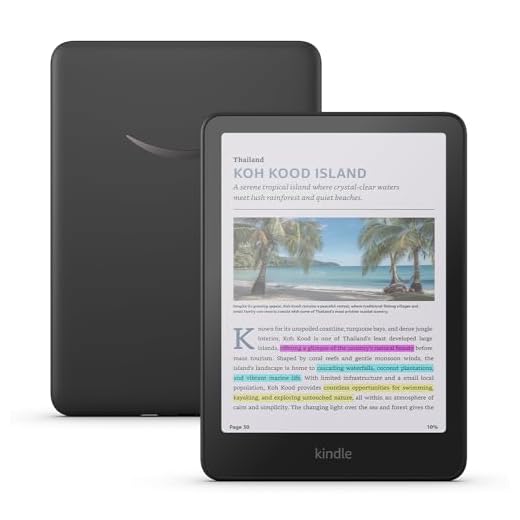
Amazon Kindle Colorsoft (newest gen) | With colour display and adjustable warm light – 16 GB
- Read in colour – The new 7″ Colorsoft display is high-contrast and easy on the eyes, with paper-like colour that brings covers and content to life.
- A brand-new experience – The Colorsoft display is optimised for reading in colour and is different from the Paperwhite display.
- Colour your pages – Highlight text in yellow, orange, blue and pink.
- Marathon reading – A single charge via USB-C lasts up to 8 weeks.
- Read in any light – Adjust the display from white to amber to read in bright sunlight or in the dark.
- Waterproof and worry-free – Take your stories by the pool, in the bath, or anywhere in between.
- Use the Page Colour feature to invert the black text and white background inside books. While different from Dark Mode, it enables comfortable reading while still displaying colourful images and covers.
- Massive selection – Instantly access millions of titles in the Kindle Store, and add a Kindle Unlimited subscription for all-you-can read access to a catalogue including best sellers.
In Detail: What is the Kindle Colorsoft?
At its core, the Kindle Colorsoft is a premium Kindle Paperwhite that’s been given a color screen. It boasts a 7-inch, glare-free “Colorsoft” display, all the features we love from the high-end Paperwhite line, and a few new tricks.
Amazon promises paper-like color that brings book covers, charts, and comics to life. It also introduces color highlighting, allowing you to mark up passages in yellow, orange, blue, and pink.
Beyond the new screen, you get the gold-standard Kindle feature set: a “marathon” 8-week battery life, modern USB-C charging, IPX8 waterproofing for “worry-free” reading by the pool or in the tub, and an adjustable warm light that shifts the screen from cool white to a warm amber for comfortable late-night reading.
On paper, it’s the perfect e-reader. But the reality, as hundreds of users have found, is all about setting your expectations.
Core Feature Analysis
The “Colorsoft” Display: A Revolution, or a Compromise?
The Claim: A “high-contrast,” “easy on the eyes” display with “paper-like color that brings covers and content to life.”
The Reality: This is, without a doubt, the most important and divisive feature of the Colorsoft. If you’re expecting an iPad-level screen, stop right now. Based on a consensus of user experiences, the key word here is muted.
As one reviewer put it after a side-by-side comparison, “On standard mode, the colors are very muted.” This sentiment is the most common takeaway; the AI-generated summary of 446 reviews notes that many users find the color “not worth it due to muted colors.”
However, this isn’t necessarily a failure. It’s a trade-off. In exchange for “muted” colors, you get a screen that “feels more like reading a book” and “does not bother my eyes,” as one 5-star reviewer (Darth Ayline) explained. This user, who “tried switching to a tablet to read books,” “didn’t like dealing with the bright tech lights” and found the Colorsoft to be “everything I’ve wanted.”
The device offers “standard” and “vivid” color modes. Reviewers note that bumping it to “vivid mode” makes the colors “look good,” but they still aren’t the glowing, emissive colors of an LCD or OLED screen. This is still e-ink, and that’s the entire point. It’s fantastic for seeing book covers as the author intended, reading graphic novels, or viewing charts and graphs in a textbook.
Verdict: It delivers on “color e-ink,” but it’s a compromise. This is a paper-like screen with a hint of color, not a vibrant tablet display.
Readability and Text: Still a Best-in-Class Kindle?
The Claim: A 300 ppi (pixels per inch) black-and-white resolution, optimized font technology, and an adjustable warm light for reading in any condition.
The Reality: This is a resounding home run. The biggest fear was that the color filter would make text fuzzy. The user reviews flatly debunk this.
One meticulous user who owns both a Paperwhite and the new Colorsoft stated, “I’ve examined the Colorsoft and Paperwhite side by side. The crispness and definition of the text is identical on both.” This directly refutes the few complaints about fuzzy text. For its primary purpose—reading novels—the Colorsoft is every bit as sharp and “easy on the eyes” as its black-and-white sibling.
When you combine that 300-ppi text with the adjustable warm light—letting you shift from a sterile blue-white for daytime to a cozy, eye-friendly amber at night—you have a best-in-class reading experience.
Verdict: Absolutely. For pure text reading, it’s as good as a Paperwhite, which remains the industry’s gold standard.
Battery Life, Build, and Waterproofing
The Claim: “Marathon reading” with up to 8 weeks of battery, a “sturdy” design, and IPX8 “worry-free” waterproofing.
The Reality: Amazon delivers on its premium promises. The 7-inch, 7.6oz (215g) body—about the weight of a baseball—is “easy to hold and doesn’t feel heavy,” according to one long-time Kindle user (‘D’). The same user notes the Colorsoft “feels just as sturdy as other versions I’ve owned.”
The IPX8 waterproofing, which protects against submersion in fresh water, remains a key feature for anyone reading in the bath or by a hotel pool in Florida or California.
The 8-week battery life is a beast, though it’s worth noting it’s a step down from the 12-week battery of the standard Paperwhite. This is a small price to pay for the color display. Crucially, one user (JAG526) reported “no big drain on battery by using vivid mode,” so you don’t have to be afraid to use the new features.
Verdict: Excellent. It maintains all the premium, durable features that justify the “Paperwhite” family name.
Kindle Colorsoft vs. The Competition
The Kindle Colorsoft doesn’t just compete with other Kindles; it faces a new wave of color e-readers, primarily from Kobo.
| Feature | Kindle Colorsoft | Kindle Paperwhite (Signature) | Kobo Libra Colour |
|---|---|---|---|
| Display | 7″ Colorsoft (150 ppi color) | 6.8″ E-Ink (300 ppi B&W) | 7″ Kaleido 3 (150 ppi color) |
| Battery Life | Up to 8 weeks | Up to 12 weeks | Up to 6 weeks (40 days) |
| Waterproof | Yes (IPX8) | Yes (IPX8) | Yes (IPX8) |
| Stylus Support | No | No | Yes (Sold separately) |
| Ecosystem | Amazon/Kindle Store | Amazon/Kindle Store | Kobo Store / OverDrive |
| Price (approx.) | $219.99 (Est.) | $189.99 | $219.99 |
The choice here comes down to ecosystem and features.
If you’re a text-only reader, the Kindle Paperwhite Signature Edition is a better value. It has sharper 300-ppi B&W resolution, a longer 12-week battery, and a lower price.
The real battle is against the Kobo Libra Colour. Priced identically, the Kobo uses a similar 7-inch Kaleido 3 color screen and is also waterproof. The Kobo’s two trump cards are stylus support for note-taking and its seamless, built-in integration with OverDrive (Libby), which is the system most US public libraries use for e-book lending.
For most American users, the choice will be simple: Are you already locked into the Amazon/Kindle ecosystem, or do you want the best device for borrowing library books?
Our Verdict
The Kindle Colorsoft is a fantastic iteration, not a revolution. It’s built for the dedicated Kindle user who has been craving a splash of color for covers and highlights and is willing to pay the premium for it.
This device is for the reader who, like user Darth Ayline, “missed having color” but “didn’t like dealing with the bright tech lights” of a tablet. It finally bridges that gap.
If you’re a “wait for a sale” kind of person (as reviewer ‘D’ suggests) or you only read black-and-white novels, save your money and get the excellent Kindle Paperwhite. But if you read comics, highlight your non-fiction, or simply want the newest and best device in Amazon’s ecosystem, the Colorsoft is the new king of Kindle.
Pros and Cons
| Pros | Cons |
|---|---|
| Crisp 300-ppi Black-and-White Text | Colors are Muted, Not Vibrant |
| Adjustable Warm Light | “Priced High” vs. B&W Models |
| Full IPX8 Waterproofing | 8-Week Battery (vs. 12 on Paperwhite) |
| Sturdy, Lightweight 7-inch Design | No Stylus Support (unlike Kobo) |
| USB-C Charging Port | |
| Color is Great for Covers & Highlights |
Final Rating: 4.3 / 5
Additional Information
- Manufacturer: Amazon
- First Available: approx. September 2025
- ASIN: B0CGVSKR1G
- Storage: 16GB
- Dimensions: 5″ x 7″ x 0.3″
- Weight: 7.6oz (215g)
Further Reading
For more perspectives on the new Kindle Colorsoft, why not check out Multicore, Ars Technica, PC Mag, or Amazon.com?